Je ne suis ni Monégasque, ni résident à Monaco
L'identité numérique monégasque est un service numérique permettant de faciliter l’accès à des services en ligne et de signer des documents numériques à Monaco.
Auparavant, un e-mail et un mot de passe étaient nécessaires pour accéder aux téléservices du Gouvernement ou de la Mairie. L’État de Monaco met dorénavant à disposition un moyen sécurisé et simple pour accéder à vos services en ligne.
Obtenir l'identité numérique
Si vous n'êtes pas de nationalité monégasque et que vous ne résidez pas à Monaco, vous devez être invité(e) par un service de l’Etat de Monaco à créer votre identité numérique pour disposer de l'identité numérique monégasque et des services d'authentification et de signature MConnect.
Vous recevrez dans ce cas un e-mail vous permettant de réaliser cette démarche en ligne. Référez-vous à cet e-mail et suivez les instructions.
Vous devrez installer l’application MConnect Mobile sur votre téléphone pour finaliser la création de votre identité numérique.
Téléchargez dès à présent l'application mobile sur les stores officiels Apple ou Android :
- Cliquez ici pour télécharger MConnect Mobile sur l'Apple store
- Cliquez ici pour télécharger MConnect Mobile sur l'Android store
Ou scannez le QR code ci-dessous :

M'authentifier avec MConnect
Après avoir installé votre identité numérique dans l'Application MConnect Mobile, vous pouvez vous authentifier sur les services en ligne partenaires MConnect.

- Accédez au service en ligne souhaité et cliquez sur "M'identifier avec MConnect"
- Saisissez votre numéro de téléphone
- Vous recevez une notification sur l'application MConnect Mobile : acceptez l'authentification et validez (avec Touch ID / Face ID ou le code de l'application)
Vous êtes alors authentifié sur le service en ligne souhaité.
Créer mon Profil MConnect
Pour pouvoir gérer votre identité numérique, il est important de créer votre Profil MConnect.
Pour créer votre Profil MConnect, veuillez vous authentifier avec l'application MConnect Mobile sur https://profil.mconnect.mc, choisissez "Créer ou gérer mon profil", puis suivez ces étapes :
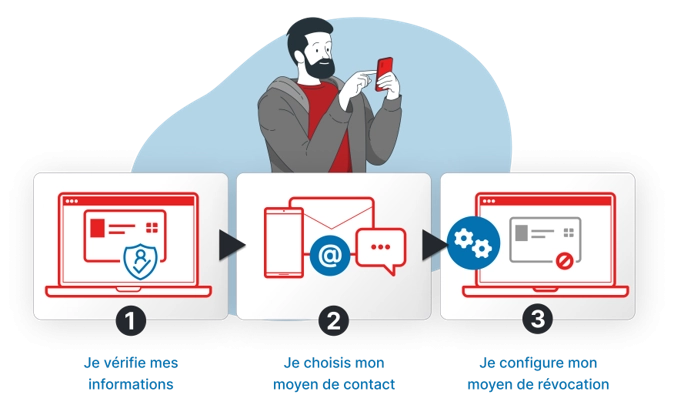
Vous pourrez ainsi :
- Renouveler vos certificats électroniques, qui vous permettent de vous authentifier et signer électroniquement avec MConnect
- Changer votre identité numérique de téléphone
- Être notifié(e) de l'expiration prochaines de vos certificats électroniques. Ces derniers ont une durée de vie de 3 ans.
- Révoquer (désactiver) vos certificats électroniques en ligne si besoin, en cas de perte de votre téléphone par exemple
- Être notifié(e) en cas d'interruption de service majeure
Renouveler mes certificats électroniques ou changer de téléphone
Vous pouvez renouveler vos certificats électroniques ou changer votre identité numérique de téléphone en autonomie depuis votre Profil MConnect, onglet "Renouvellement". Vous devez pour cela avoir préalablement créé votre Profil MConnect.
Si vous n'avez pas créé votre Profil MConnect, et que vous n'avez plus votre identité numérique installée dans l'application MConnect Mobile, veuillez contacter notre support usager.